
Workflow builder
A visual, node-based pipeline that turns raw channels into per-object measurements.
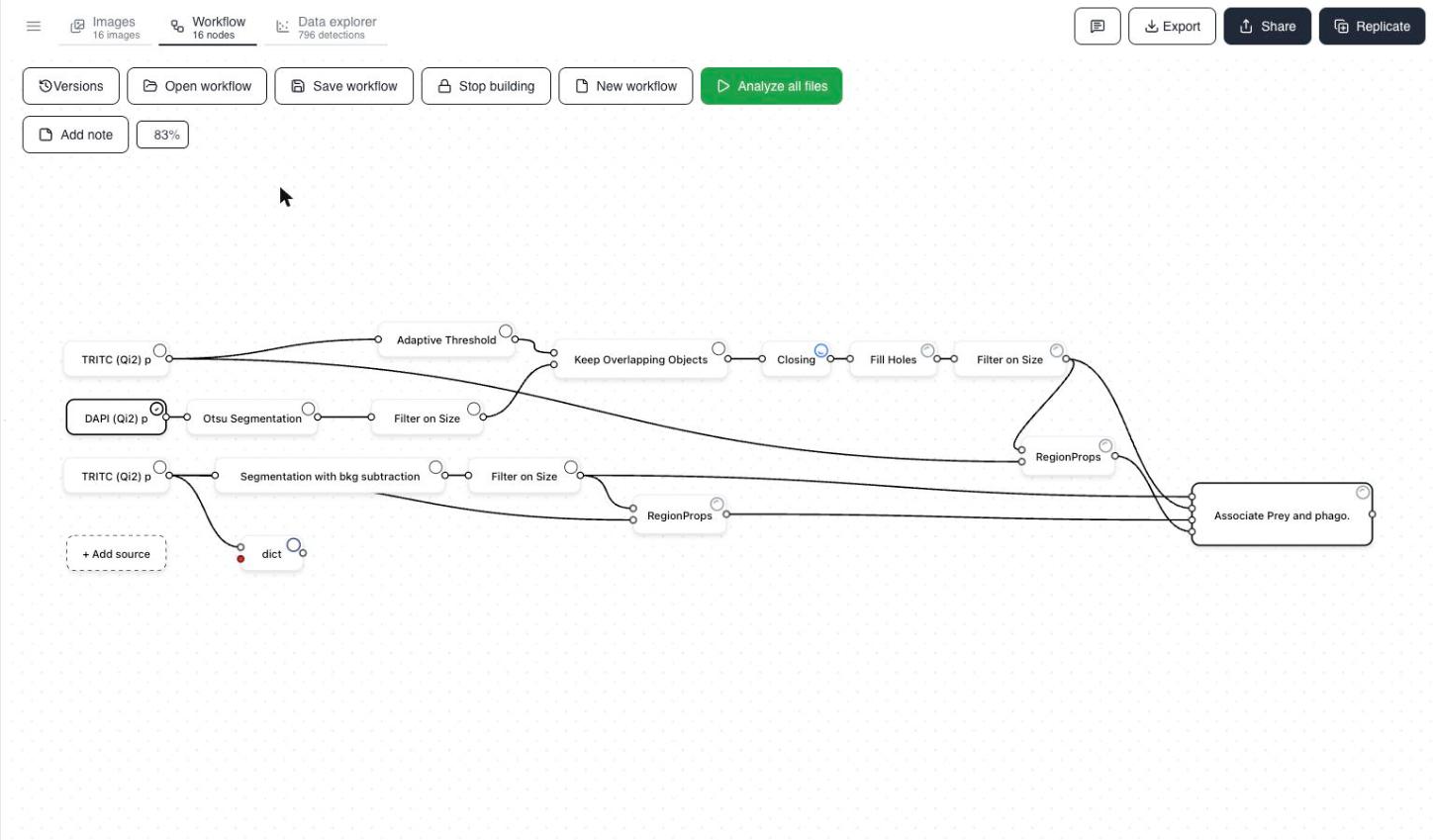
The Workflow tab shows your analysis as a graph. Source channels on the left feed into a chain of processing and measurement steps (nodes), which converge on a final aggregation (sink) node on the right. Every node produces data that downstream nodes can consume.
Building a workflow
Press Start analysis and assemble the pipeline in the visual builder, or start from a saved template. See Build a workflow using workflow builder.
Who can build workflows
Direct access to the Workflow tab is not enabled for every account. It is switched on for you in advance if your team is set up to build pipelines - most new accounts start without it.
If it is not enabled, then whenever you upload data to a new dataset and press Start analysis, Cytely asks how you want the workflow made:
- Build the workflow for me - the Cytely team builds and runs the pipeline for you. Once you choose this, the workflow is no longer editable by you for that dataset.
- I want to build a workflow myself - the Workflow tab opens and you assemble the pipeline in the visual builder.
The choice is made per dataset at the point you start the analysis, so pick "I want to build a workflow myself" if you expect to tune the pipeline yourself later.
Typical pipeline shape
Most workflows follow the same rough pattern:
- Segmentation turns raw channel intensities into object masks. Channels are often segmented separately (e.g. Otsu for nuclei, Adaptive Threshold for a marker), then combined.
- Morphological clean-up - closing gaps, filling holes, and keeping overlapping objects - tidies up the masks.
- Filter on size removes noise and oversized artifacts, leaving only well-formed objects.
- Measurement nodes (like Morphology) quantify each object.
- Aggregation at the sink node links related objects - for example, associating "prey" with their parent phagocytes and rolling measurements up per cell.
Toolbar
- Versions - browse and roll back workflow history.
- Open / Save / New workflow - reuse pipelines across datasets.
- Stop building - lock editing on a finished workflow.
- Analyze all files - (re)run the pipeline across the full dataset. Cytely processes in the background and emails you when results are ready.
- Add note - annotate the canvas with context for collaborators.
The canvas can extend beyond the visible area in either direction and does not auto-fit: drag empty canvas space to pan, and use the zoom-percent control to fit more of the pipeline on screen.
Workflows are not guaranteed to persist between sessions, so use Save workflow once a pipeline works and Open workflow to bring it back.